 BestAmazonBooker
Post a truck vs hunting the Amazon Relay board
Post a truck vs hunting the load board
On Amazon Relay, Post a truck is how you advertise available capacity: where the truck is (or will be), when it is free, equipment, and related details so the network can match freight to you. Hunting means searching and accepting listed loads on the board. Exact screens change as Relay updates — always confirm in Relay before you submit. BestAmazonBooker is not affiliated with Amazon or Amazon Relay.
Use posting when:
- The truck has clear open capacity and you want inbound matches
- Board hunting is thin for your lanes or equipment
- You would rather signal availability than refresh endlessly
Keep hunting the load board when:
- You need a specific loaded opportunity right now
- You are filtering hard on payout, rate, or excludes
- You are watching bobtails, empties, or time-sensitive freight
Many teams do both: hunt active lanes with filters and highlights, then post when the truck would otherwise sit. Decision helpers on the board — like bobtail badges and weight chips — help you choose which loads deserve a click before you switch into posting mode.
Post a truck from a load
BestAmazonBooker can start Post a truck or Quick Post from an expanded load sheet and prefill fields from the work opportunity so you retype less. The buttons appear whenever you can book through BestAmazonBooker: on Free until that day's one booking is used, and anytime on Pro.
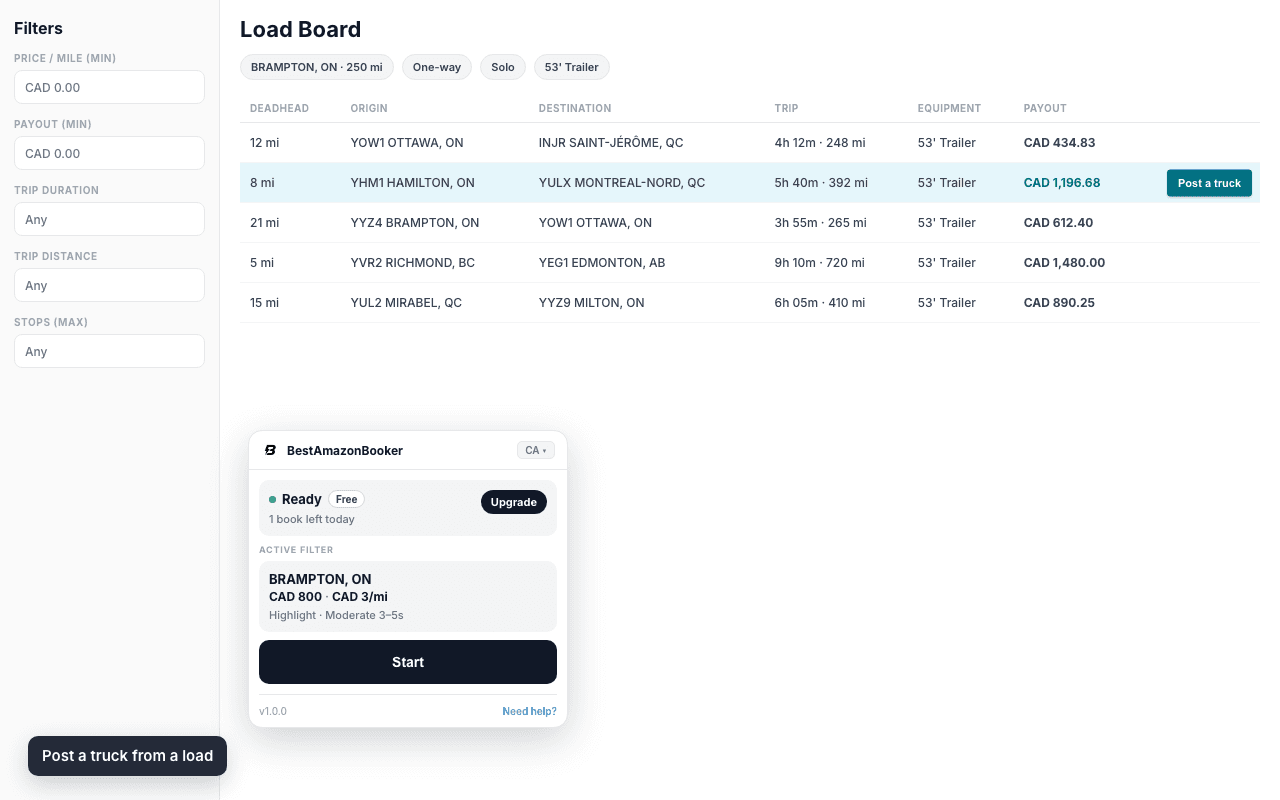
You still review and submit in Relay. Follow Amazon Relay's terms and your carrier policies.
Post a truck lives in the same Amazon Relay Chrome extension as the board cues. When you would rather hunt and book matches, the Amazon Relay auto booker page explains Free vs Pro booking.
Posting more than one truck (bulk / open capacity)
Search queries like “bulk Post a truck” usually mean several trucks or several windows, not a hidden batch API. Amazon Relay still takes one offer at a time: you submit capacity per truck and window. BestAmazonBooker can start Post a truck from a load so you retype less; you still review and submit in Relay.
FAQ
When should I post instead of hunt the board?
Post when capacity is open and hunting is inefficient; search when you need a specific loaded job now. Use bobtail and weight cues while you hunt, then post when the truck would otherwise sit.
How does BestAmazonBooker help with Post a truck?
It adds Post a truck / Quick Post to an expanded load, with prefills from the work opportunity. On Free they show until you have used that day's booking; on Pro they are always available.
What does Post a truck mean?
It means offering available truck capacity on Amazon Relay so the network can match freight to your supply — not only searching and accepting listed loads.
Do I need Pro?
No. Free users get the Post a truck and Quick Post buttons until that day's one booking is used; Pro keeps them available all day. Relay's own posting remains available without the extension.
Try it on your board
Install BestAmazonBooker, open Relay in Chrome, expand a load, and use Post a truck or Quick Post. Pair it with filters and bobtail/weight cues so you decide what to hunt vs what to offer.
Prefer the store listing? BestAmazonBooker on the Chrome Web Store. Also see the bobtail guide and FAQ.